
Demand analytics for laboratory procurement

Forecast demand.Plan purchases.

Buy for demand. Plan with confidence.

A laboratory specialist selecting a sample from a rack of vials.

Forecast demand. Plan the purchase.

Epiq uses laboratory activity and stock records to forecast reagent demand and recommend purchases. Your team decides what to buy; the supplier receives a request with reagents and required quantities.

Compare the workflow
Stock balance
Epiq stock balance report with material, warehouse, quantity and value columns.
Laboratory workspace
Epiq laboratory workspace with the replenishment-request entry.
Stock movements
Epiq stock movement journal, shown with an issue filter and document statuses.
B1

Request document

Reagent
RG-PCR
Batch
PCR-01
Warehouse cell
B1
Team conversation

Which balance is up to date?

Team conversation

Which batch was issued?

Material cost181,650
  1. Demand forecast
  2. Purchase recommendation
  3. Your team decides
  4. Supplier request
Image of the Epiq company logo for laboratory demand and procurement analytics.

Predictive reagent analytics

Epiq stock balance with example material and warehouse records
B1

Stock context

RG-PCR · PCR-01

Warehouse cellB1
Epiq recommendsYour team decides

Review the recommendation and adjust the purchase quantities before sharing.

Supplier request

Reagents and required quantities, after your team’s review.

Reagent · Required quantity

Forecast → recommendation → human decision → supplier. Stock and material movements provide the context for planning.

Process illustration. Saved product screens show example stock, request and movement records used as planning inputs.

Buy from the forecastand available stock.

Demand forecast
Anticipate reagent needs from laboratory data.
Stock context
Consider balances, batches and expiry.
Purchase recommendation
Review which reagents to buy and in what quantities.
Your decision
Adjust the recommendation and prepare a supplier request.
Research demand, batch stock and supplier offers inform a purchase plan with quantity, delivery and cost.Planning inputsResearch planDemand forecastStock by batchExpiry and locationSupplier offersPrice and lead timeSupplier requestQuantityDeliveryCostReview the forecast, stock andsupplier offers to prepare asupplier request.
Research demand, batch stock and supplier offers inform a purchase plan with quantity, delivery and cost. Planning inputs Research plan Demand forecast Stock by batch Expiry and location Supplier offers Price and lead time Supplier request Quantity Delivery Cost

Data behind the forecast.

Stock balances, laboratory requests and material movements provide the context for reagent planning. Explore the saved product screens.

Localized illustrations based on saved Epiq screens. Example records.

Stock balances

Balances by material and warehouse. Opening stock, receipts, issues and closing stock for the selected period.
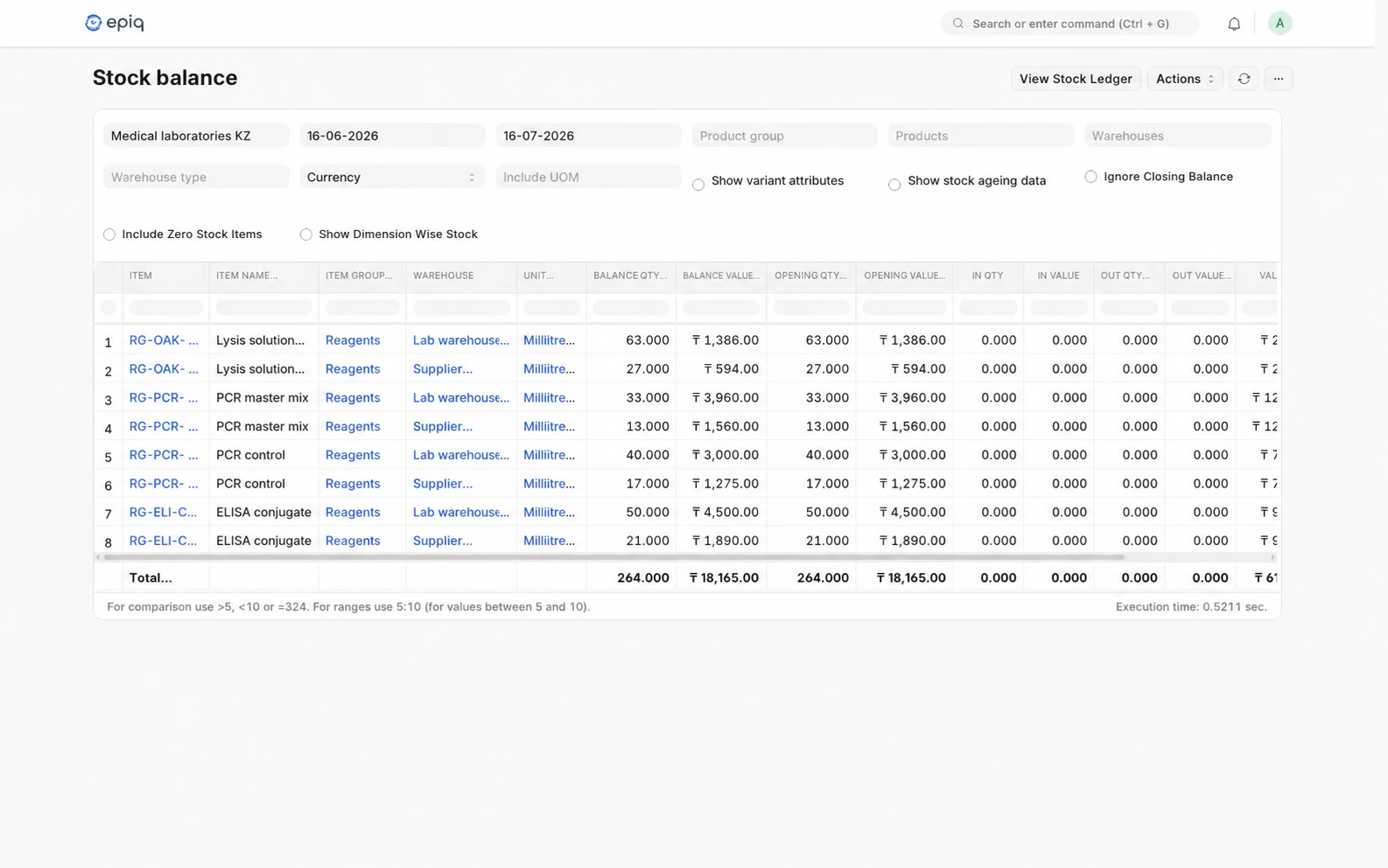
Epiq stock balance report with material, warehouse, quantity and value columns.
Open full-size screen
Requests

Start a replenishment request from the laboratory workspace, alongside stock balances and research.
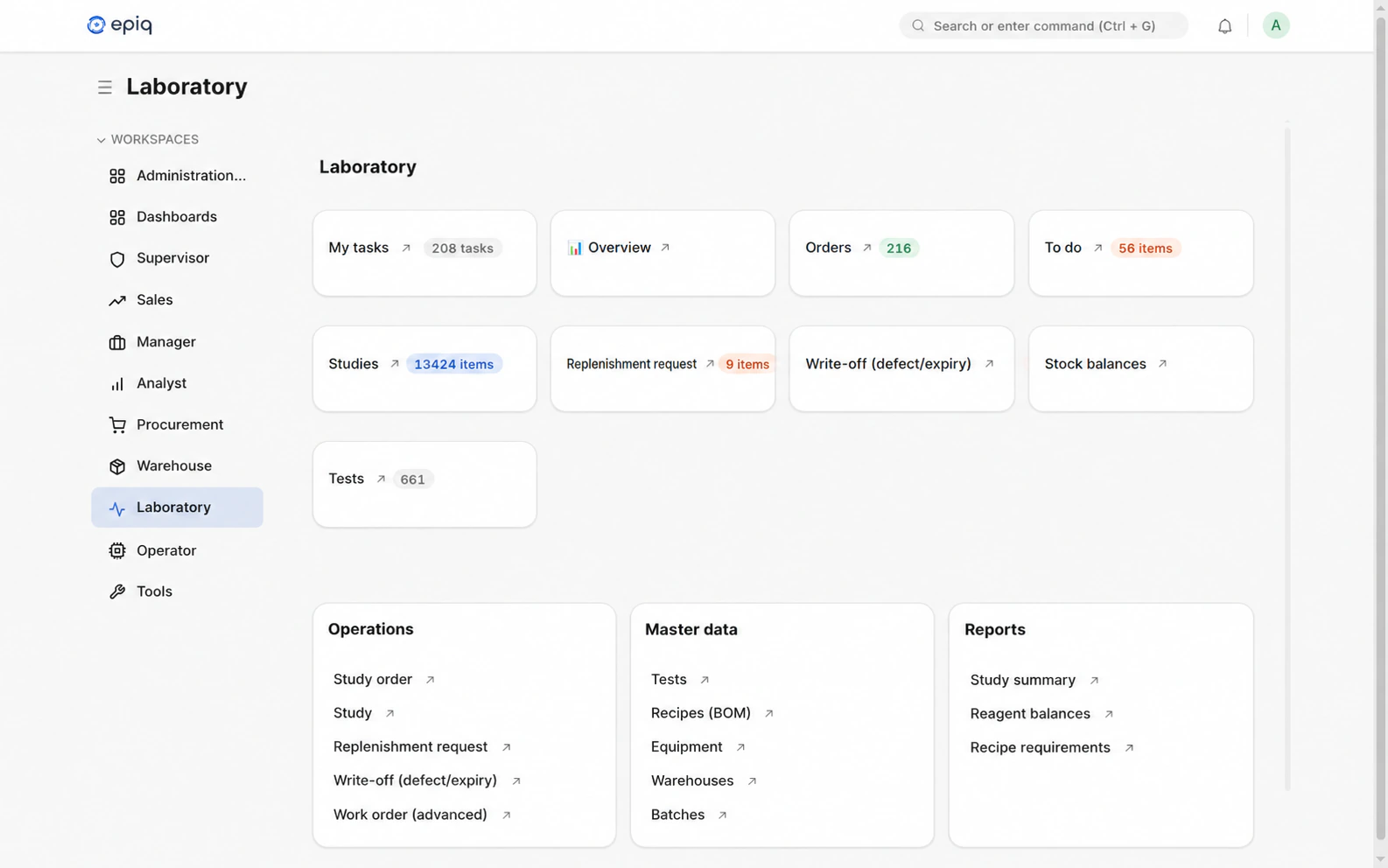
Epiq laboratory workspace with the replenishment-request entry.
Open full-size screen
Transfers

The stock movement journal brings together operation types, document statuses, source warehouses and destination warehouses.
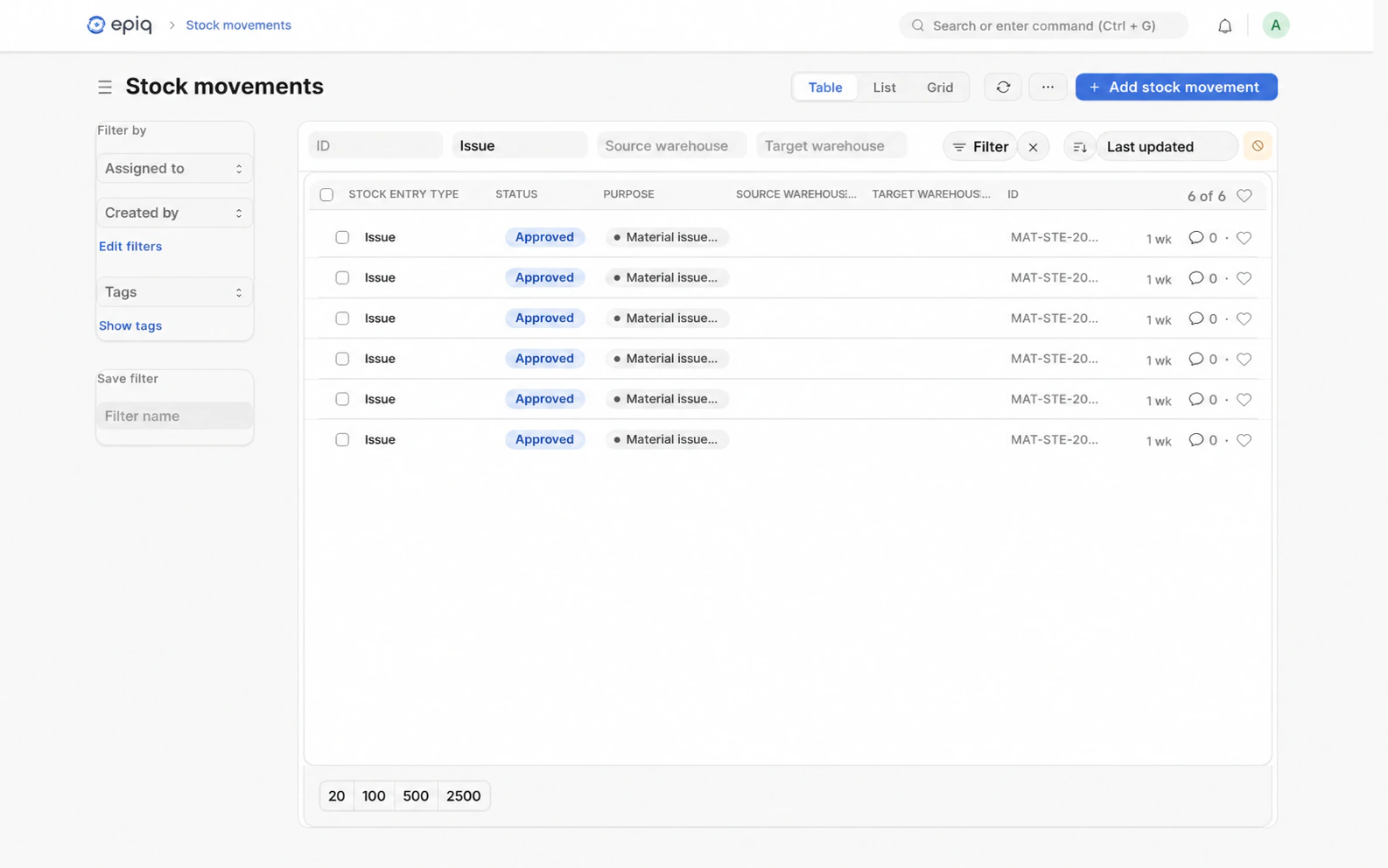
Epiq stock movement journal, shown with an issue filter and document statuses.
Open full-size screen

Warehouseto laboratory.

Research
Connect lab work with reagent use.
Requests
Consider laboratory requests alongside predicted demand.
Movements
Use warehouse issues and transfers as planning inputs.
Procurement
Prepare a reagent and quantity list for the supplier.
Each warehouse cell has its own parcel. The B1 parcel goes from cell B1 to the laboratory; the request travels toward the warehouse.LaboratoryWarehouseA1A1A2A2B1B1B2B2C1C1C2C2RequestTransferB1Parcel B1One cell. One assigned parcel.A matching code links the warehouse cell to the parcel prepared for thelaboratory.
Each warehouse cell has its own parcel. The B1 parcel goes from cell B1 to the laboratory; the request travels toward the warehouse. Warehouse A1A2 B1B2 C1C2 A1A2 B1B2 C1C2 Request Transfer B1 Laboratory One cell. One assigned parcel.

How Epiq works.

Epiq: from laboratory data to a supplier purchase listLaboratory, warehouse, procurement and finance teams provide source data from ERP, LIMS and REST API connections. Epiq uses consumption, stock, batch and expiry records to forecast reagent demand and recommend purchase quantities. A person reviews the recommendation and decides what to buy. The result is a supplier request with reagents and required quantities.Epiq: from laboratory data to a supplier purchase listLaboratory, warehouse, procurement and finance teams provide source data from ERP, LIMS and REST API connections. Epiq uses consumption, stock, batch and expiry records to forecast reagent demand and recommend purchase quantities. A person reviews the recommendation and decides what to buy. The result is a supplier request with reagents and required quantities.
Process diagram. Data sources and connections are agreed for each pilot. Epiq recommends; your team decides which quantities to share with the supplier.

Workspaces

  • Finance & control
  • Supply & inventory
  • Laboratory & quality
  • Management & leadership

Understand demand.Plan each reagent.

  • Stock by material and batch

    Materials and batches in viewA matrix of stock cells highlights one batch and its related material cells.

    Manual task simplified

    Compare material and batch stock sheets.

  • Recommendations you review

    Recommendations reach a human decisionLayered records lead to a recommendation checked by a person.

    Manual task simplified

    Collect the data needed to review a purchase.

  • Forecast demand and purchases

    Forecast demand beside available stockThree reagent rows compare forecast demand with stock to support a procurement recommendation.

    Manual task simplified

    Calculate purchase quantities from demand and stock.

  • Consumption in context

    A material moves from warehouse to laboratoryA routed path links a warehouse cell to the matching laboratory parcel, illustrating consumption data for planning.

    Manual task simplified

    Match warehouse issues to lab receipts.

  • Costs behind the purchase

    A reagent within its cost allocationNested circles connect reagent, batch and cost information used for procurement planning.

    Manual task simplified

    Link reagent demand to cost records.

The geometry illustrates the tasks. Selected cells, rows and allocations are examples.

Integrations

  • Image of the 1C:ERP company logo representing an integration option for Epiq.1C:ERP
  • Image of the SAP company logo representing an integration option for Epiq.SAP
  • Image of the Microsoft company logo representing an integration option for Epiq.Microsoft
  • Image of the Oracle company logo representing an integration option for Epiq.Oracle
  • Image of the Odoo company logo representing an integration option for Epiq.Odoo
  • Open REST API

Work with your existing data sources. We agree on the systems, required data and connection method during the pilot.

Our partners

  • Image of the logo of OLYMP Clinical Diagnostic Laboratories, an Epiq partner.

    OLYMP Clinical Diagnostic Laboratories

  • Image of the logo of Department of Public Health of Astana city, an Epiq partner.

    Department of Public Health of Astana city

  • Image of the logo of Qaz.AI, an Epiq partner.

    Qaz.AI

  • Image of the logo of Akhmet Baitursynuly Kostanay Regional University, an Epiq partner.

    Akhmet Baitursynuly Kostanay Regional University

  • Image of the logo of Institute of Forensic Examinations for the Kostanay Region, an Epiq partner.

    Institute of Forensic Examinations for the Kostanay Region

How the pilotworks.

Start with one laboratory and a defined group of reagents. Agree how to assess the forecast and procurement recommendations.

  1. Define the scope

    Choose the laboratory and reagent group. Agree the planning horizon and criteria for a useful result.

  2. Connect the data

    Identify laboratory activity, reagent consumption and stock sources. Agree access with your team.

  3. Review recommendations

    Review forecast demand and proposed quantities with the team. Adjust the request before sharing it with the supplier.

  4. Assess the result

    Compare the forecast with actual demand and assess the recommendations against the pilot criteria.

Start witha focused pilot.

Tell us how your laboratory plans reagent purchases.

Questions & answers

What to include in your email

  • The laboratory name and your role
  • How you track stock and plan purchases
  • The problem you want to solve
info@epiq.top

Questions & answers

Practical answers about scope, systems and your team.

What does an EpiQ AI pilot look like?

We begin with one recurring operating decision, connect the data needed for that decision, and give the responsible team a working EpiQ workflow. The goal is to evaluate fit and value before expanding the scope.

Can EpiQ work with our current ERP and data sources?

EpiQ is designed to connect with existing ERP, finance, inventory, laboratory, and operational systems. Pilot scope determines which sources and integration method are appropriate first.

Which teams usually start first?

Finance, supply, inventory, operations, and quality teams are strong starting points because they make recurring decisions from shared data and can define a concrete outcome.

How do you handle access and approval requirements?

We map source ownership, user roles, decision rights, and approval steps during pilot design. The workflow is shaped around your governance requirements rather than bypassing them.